The LMS your college can call its own.
C8 Learn pairs a focused learner portal with a full admin panel. Build courses, assess and mark, track progress, issue certificates and support students — all under your own brand.
- Courses → modules → chapters → lessons
- MCQ, written and upload assessments
- PDF certificates
- Built-in support desk
- Your brand, your domain
Two applications, one learning platform.
Students log in to a clean, distraction-free portal. Your team works in a separate admin panel with everything needed to author content, manage enrolments, mark work and report. Both share one database and one brand.
Where students learn
A guided path through each course with live progress, assessments, results, notes, certificates and a support desk in the same place.
Where the college runs
Course authoring, students and enrolment, a marking queue, reports, media, integrations and user roles for the whole academic team.
Structured learning
Courses hold modules, modules hold chapters, chapters hold lessons. Each lesson can carry text, images, video, podcasts and an e-book export.
Assessments and marking
Multiple choice is marked automatically. Written answers and uploaded documents land in a marking queue with attempts, pass marks and feedback.
Progress and certificates
Progress is tracked per lesson, chapter, module and course. Completed modules generate a branded PDF certificate the student can download.
Support desk
Students raise questions from any page. Conversations thread in the admin panel with email notifications, so nothing gets lost in an inbox.
White-label by design
Logos, colours, emails, certificates and support contacts come from a theme and environment file. No college-specific code, ever.
Integrations
An enrolment API with keys and rate limits, outbound webhooks, spreadsheet exports, course export and import between instances, and a background job queue.
- FrameworkCakePHP 4 on PHP 8
- DatabaseMySQL / MariaDB
- Front endBootstrap, responsive
- DocumentsPDF certificates and e-books
- EmailResponsive MJML templates
- HostingRuns on shared or dedicated PHP hosting
A calm place to learn.
The learner portal shows students exactly where they are and what comes next. No clutter, no hunting for the right page.
One course, one clear path
Every module shows its chapters, assessments, results, videos and podcasts as tiles, each with a live count. Progress rings keep the student oriented at course and module level.
- Modules listed in order with completion ticks
- Course banner and module imagery from the theme
- Optional module locking until prerequisites are met
Progress that tracks itself
Opening a module lists its chapters with lesson counts and completion. Lessons are marked as studied automatically, and the sidebar rings roll up to chapter, module and course.
- Chapter cards with imagery and lesson counts
- Per-chapter progress percentage
- Breadcrumbs from course to lesson at every level
Rich lessons with video, e-book and notes
Lessons combine formatted text, embedded video and podcasts. Students can export a chapter as an e-book PDF, and take notes that stay attached to the lesson.
- Embedded Vimeo or YouTube video and audio
- E-book PDF export per chapter
- Note-taking panel available on every lesson
- Module video and podcast libraries
Assessments built for real learning
Each module carries formative and summative assessments. Multiple choice questions are marked on submission, written answers and document uploads go to the marking queue.
- Question-by-question progress with save and continue
- Pass marks, attempt limits and optional time limits
- Document upload assessments for portfolios of evidence
Competency at a glance
Results are grouped by module with a clear status: not yet competent, competent, or awaiting marking. Passing every assessment in a module unlocks a downloadable certificate.
- Attempt history and marker feedback per assessment
- Branded PDF certificates generated on completion
- Certificates listed under My Certificates for re-download
Help without leaving the platform
A support button follows the student on every page. Questions become conversations that your team answers from the admin panel, with email notifications both ways.
- Threaded conversations tied to the student's course
- Optional live chat widget integration
- Support team profiles shown on the course page
Run the whole college from one panel.
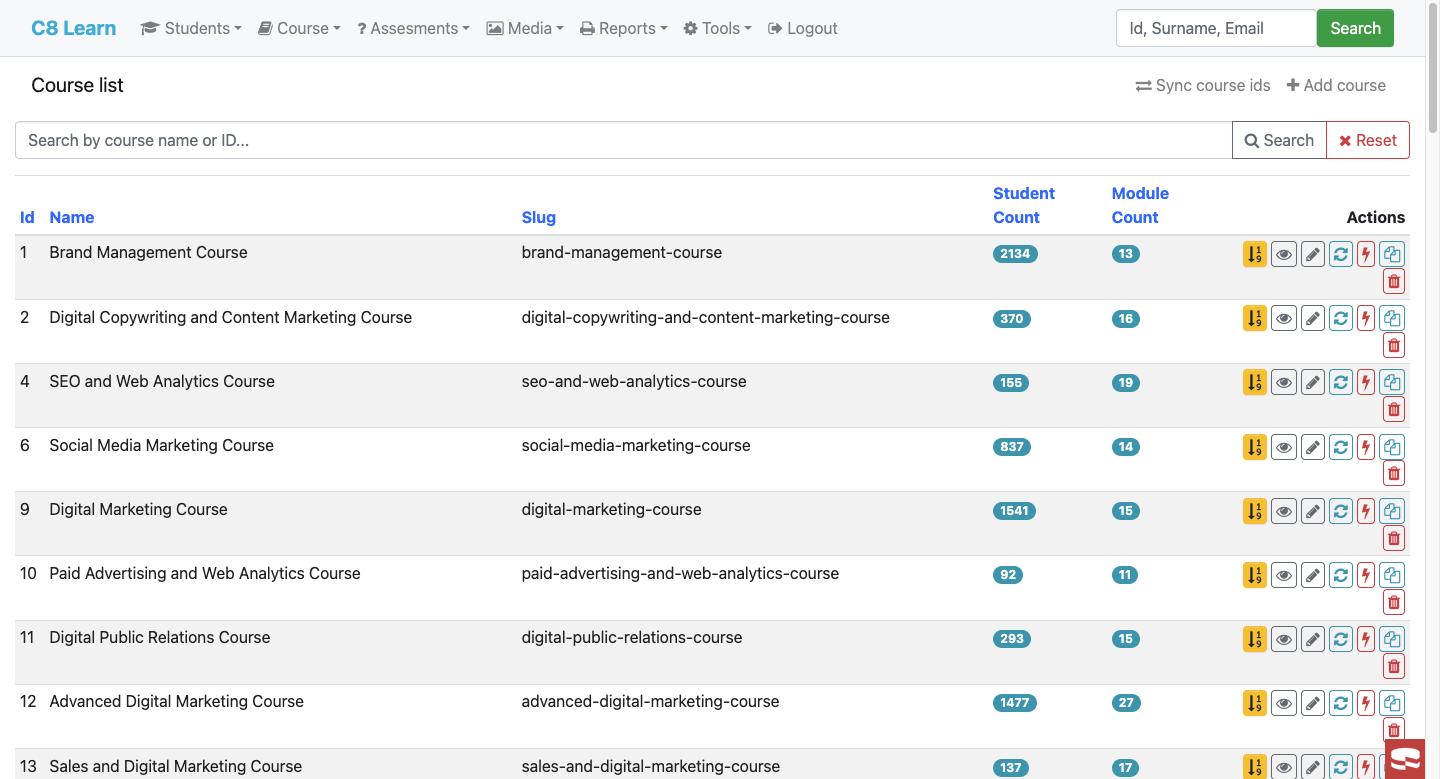
The admin application is where content is authored, students are enrolled, work is marked and reports are pulled. Role-based access keeps each team member on the screens they need.
Author once, reuse everywhere
Courses are assembled from a shared library of modules, so a module written for one qualification can sit in several courses. Counts of chapters, lessons, assessments and enrolled students are always visible.
- Clone courses and modules with their full content tree
- Publish and retire modules without deleting history
- Per-module certificate, attempt-limit and locking settings
A proper writing tool for content teams
Lessons are written in a rich text editor with headings, lists, links and media. Images and videos are managed in a media library and dropped into lessons by placeholder, so content stays portable.
- Media library with bulk image and video import
- Placeholders resolve to the right file on every deployment
- Lesson, chapter and module details on tabs in one screen
Questions, answers and pass marks
Each assessment has a type, a category, a pass mark and an optional time limit. Questions carry marks and model answers; multiple choice questions hold their options and the correct choice.
- MCQ, written Q&A and file submission types
- Randomised question order per course if wanted
- Retire an assessment without losing past results
A queue, not an inbox
Submitted work is grouped by type with counts. Markers open a submission, score it against the model answer, leave feedback and mark it competent or return it for another attempt.
- Tabs for Q&A, MCQ, submissions and activities
- Attempt number, age of submission and marker recorded
- Certificates issued automatically when a module passes
Every student, fully in view
Search by ID, name or email. A student's record shows their courses, modules, assessments, support history, notes, certificates and signed agreements on tabs, with enrolment and credential actions one click away.
- Enrol, unenrol and re-send login credentials
- Engagement and last-login tracking with inactivity filters
- Student types and statuses for different intakes
Numbers out, enrolments in
Daily dashboards, module pass reports, slow-learner reports and spreadsheet exports cover the academic side. On the systems side, an enrolment API and outbound webhooks connect the LMS to your CRM, website or billing platform.
- REST enrolment and unenrolment API with per-key rate limits
- Webhook notifications for enrolment and progress events
- Course export and import between LMS instances
- Background job queue for long-running work
More admin screens
A small software practice that builds things properly.
Creative8 Software is based in South Africa and works with clients who need software built to last rather than quickly forgotten.
We keep the team deliberately small. The person who scopes your project is the person who writes the code and the person who answers the phone when something breaks.
C8 Learn grew out of years of running online colleges' learning platforms day to day. Every feature in it exists because a college asked for it, used it, and kept using it.
Most of our work arrives through referral, which is the only marketing strategy we've ever really trusted.
See C8 Learn running with your brand on it.
Tell us about your college and the courses you run. We'll set up a demo instance, walk you through both applications and talk honestly about what a rollout would involve.
- Demo of the learner portal and admin panel
- Guidance on migrating existing course content
- Hosting, branding and integration options
We reply within one working day.